
Secure Mail · File Sharing · AI Cards · Payments · Parcels · Marketing · Service Communication
1. Core Premise
PostNL is no longer only the company that delivers letters and parcels.
In the digital age, the meaning of “post” has expanded. A letter can now be an email. A birthday card can be AI-generated. A payment can be attached to an invitation. A business mailing can be physical, digital, or hybrid. A package can carry not only a product, but also a service message, a marketing campaign, a receipt, a return label, a greeting card, or a customer relationship.
The old postal system moved paper through the country.
The new PostNL ecosystem moves trusted communication through society.
The concept is to reposition PostNL as the Dutch civic communication platform for:
private people, families, businesses, municipalities, institutions, schools, clubs, care organizations, and communities.
The new PostNL becomes a complete platform where users can:
Send secure email.
Share files.
Send a letter.
Send a parcel.
Generate an AI birthday card.
Print and mail that card physically.
Collect money for a gift.
Organize a party.
Send service updates.
Run marketing campaigns.
Send mass mailings.
Manage business communication.
Receive trusted official messages.
Switch between private and business use.
The central idea:
PostNL becomes the place where the Netherlands sends what matters.
2. The Franchise Vision
Title
PostNL: Everything You Send
Strategic Subtitle
The trusted Dutch platform for mail, files, cards, payments, parcels, campaigns, and civic communication.
Brand Promise
From letterbox to inbox. From email to printed card. From parcel to payment. PostNL connects every form of sending in one trusted place.
Core Brand Transformation
Old PostNL:
We deliver mail and parcels.
New PostNL:
We deliver trusted communication, physically and digitally.
This franchise is not about adding random features to an app. It is about building a complete communication universe around the emotional, social, practical, and commercial act of sending.
The word “send” becomes the center of the franchise.
You send a card.
You send a file.
You send a payment request.
You send a parcel.
You send an invoice.
You send a campaign.
You send a service update.
You send love.
You send proof.
You send trust.
3. Political and Social Point of View
This concept is written from a left-wing social-democratic perspective.
That means the platform should not simply become another profit-maximizing tech product. It should become a piece of public-value digital infrastructure.
The Netherlands should not depend entirely on foreign Big Tech platforms, private banks, ad-driven inboxes, and fragmented messaging services for its everyday communication.
PostNL can become a democratic alternative: commercial where appropriate, but built around social trust, universal access, privacy, worker dignity, and civic usefulness.
Social-Democratic Principles
1. Universal Access
The system must work for:
- Elderly people.
- Young people.
- Small businesses.
- Low-income households.
- Disabled users.
- People with limited digital skills.
- People who still need physical mail.
- People who prefer digital-only service.
- Citizens dealing with institutions.
- Communities organizing social life.
The platform should always offer a hybrid option:
Digital when possible. Physical when needed.
2. Privacy Before Profit
The system must not become an advertising surveillance platform.
PostNL should not sell private communication data.
PostNL should not scan private messages for ad targeting.
PostNL should not manipulate user behavior through addictive design.
The core value is trust.
3. Public Infrastructure, Not Platform Extraction
The goal is not to trap users inside an app.
The goal is to provide the Netherlands with a trusted layer for:
- Secure communication.
- Identity verification.
- File exchange.
- Social payments.
- Printed communication.
- Business mailings.
- Public-service messages.
- Community organization.
4. Worker-Positive Digital Transition
Digital transformation must not only mean fewer postal workers.
It should create new roles:
- Digital postal assistants.
- Secure mail support teams.
- Fraud prevention workers.
- AI card moderation teams.
- Local service desk workers.
- Hybrid mail operators.
- Business onboarding consultants.
- Accessibility support staff.
- Community communication advisors.
The message to workers:
The post is changing, but the public mission remains.
4. The World of the Franchise
The franchise is built around one idea:
The PostNL Account
One account connects every service.
A user can move from private to business, from email to printed mail, from card to payment, from parcel to campaign.
The platform should not feel like separate products glued together. It should feel like one ecosystem.
Main World Areas
- PostNL Portal
- PostNL Secure Mail
- PostNL Files
- PostNL AI Card Studio
- PostNL Pay
- PostNL Contacts
- PostNL Events
- PostNL Parcels
- PostNL Holiday Shop
- PostNL Business
- PostNL Marketing
- PostNL Service Communication
- PostNL Trust & Identity
5. Platform Architecture
5.1 Private Side
The private side is for citizens, families, friends, households, clubs, and informal communities.
Private User Can:
- Send and receive secure email.
- Store important messages.
- Share files with family or contacts.
- Generate AI birthday cards.
- Print and send cards by post.
- Attach a gift-payment link to a card.
- Organize parties and events.
- Track packages.
- Send parcels.
- Manage contacts and addresses.
- Receive official messages.
- Pay invoices.
- Receive receipts.
- Order stamps, cards, packaging, and seasonal products.
- Convert digital messages to printed mail.
Private Positioning
Your trusted place for mail, cards, files, parcels, payments, and people.
5.2 Business Side
The business side is for freelancers, SMEs, webshops, public institutions, municipalities, charities, care providers, schools, unions, cultural organizations, and larger companies.
Business User Can:
- Send secure customer email.
- Share files and documents.
- Create marketing campaigns.
- Send newsletters.
- Run mass mailings.
- Send printed direct mail.
- Send service updates.
- Send invoices and payment requests.
- Attach files, brochures, PDFs, and forms.
- Send AI-generated business cards or seasonal cards.
- Manage audience lists and customer segments.
- Create communication templates.
- Track delivery performance.
- Combine parcel communication with marketing inserts.
- Manage transactional mail.
- Send official documents.
- Use PostNL as a trusted sender.
Business Positioning
One platform for customer communication: email, secure mail, direct mail, parcels, cards, files, and campaigns.
6. Core Product Pillars
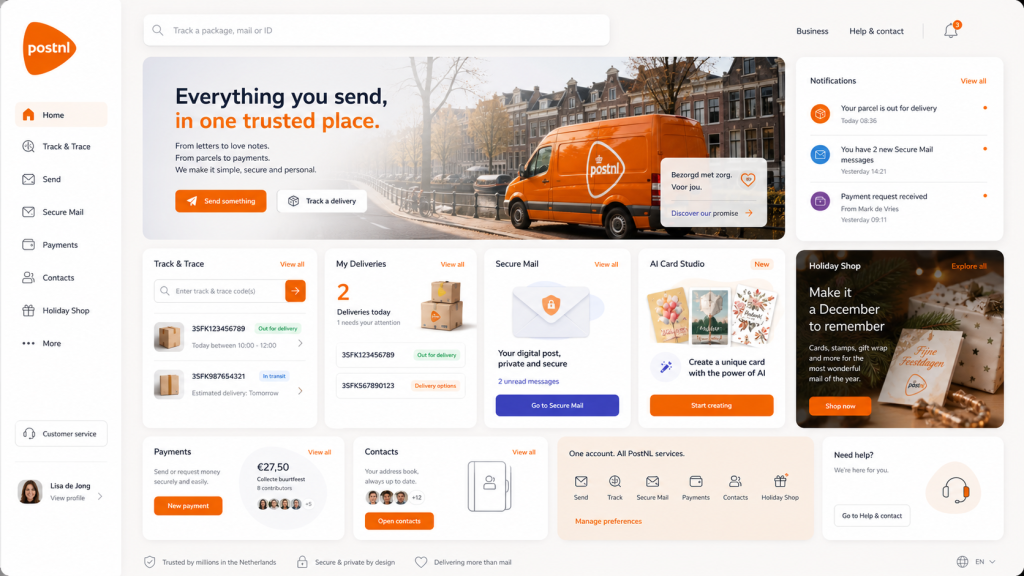
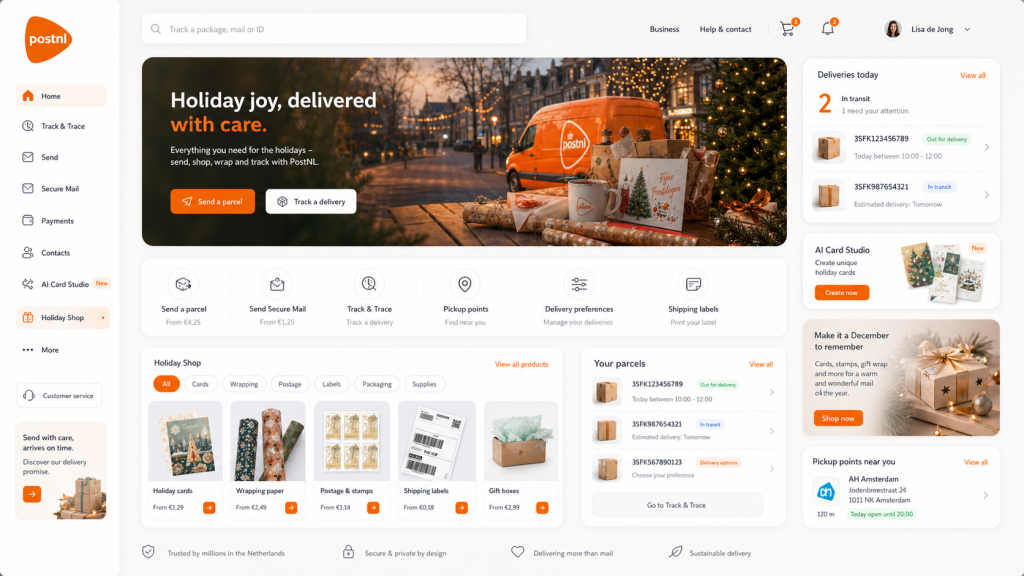
Pillar 1: PostNL Portal
The portal is the home screen of the ecosystem.
It should feel like a dashboard for all forms of sending.
Main Features
- Private / Business switch.
- Universal search: “Track a package, mail, file, contact, campaign, or payment.”
- Secure Mail overview.
- File Sharing overview.
- Track & Trace.
- AI Card Studio.
- Payments.
- Contacts.
- Holiday Shop.
- Business Campaigns.
- Service Messages.
- Notifications.
- Delivery calendar.
- Trust and security status.
Portal User Experience
The homepage should answer:
What did I receive?
What do I need to send?
What is arriving today?
What needs payment?
What files were shared?
What birthdays are coming?
What campaigns are active?
What service messages need attention?
Portal Tagline
Everything you send, in one trusted place.
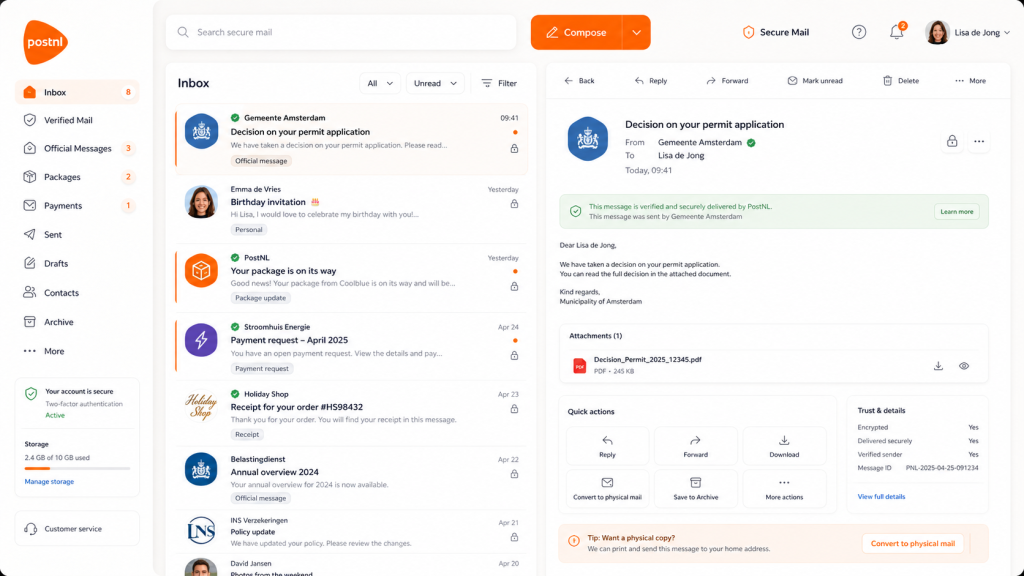
Pillar 2: PostNL Secure Mail
Secure Mail is the email and digital-letter layer of the platform.
It is not just normal email with a PostNL logo. It should feel like verified digital post.
Features
- Encrypted email.
- Verified sender badges.
- Official message labels.
- Personal mail labels.
- Business mail labels.
- Service communication labels.
- Marketing communication labels.
- Newsletter labels.
- Payment request labels.
- Package update labels.
- File attachment preview.
- Read receipts.
- Delivery proof.
- Archive.
- Spam and phishing protection.
- Convert to physical mail.
- Send as printed card.
- Send as registered digital mail.
Key Concept
Every message can become physical.
A user writes an email and can choose:
- Send as email.
- Send as secure message.
- Send as printed letter.
- Send as printed card by post.
- Attach payment request.
- Attach file-sharing link.
- Schedule delivery.
- Send to one person.
- Send to a list.
Example Button
“Print & Send by Post”
This is the magic feature.
The user writes digitally, but PostNL handles the physical production and delivery.
Pillar 3: PostNL Files
PostNL Files is the secure file-sharing system.
This makes sense because communication is not only text. People send documents, photos, contracts, invoices, forms, medical documents, school papers, legal notices, campaign materials, print files, brand assets, and delivery documents.
Private File Sharing
Private users can share:
- Family photos.
- Birthday card assets.
- Party planning files.
- Address lists.
- Receipts.
- Important documents.
- Scans.
- Documents for government or housing.
- Files attached to secure mail.
Business File Sharing
Business users can share:
- Brand assets.
- Campaign files.
- Customer documents.
- Invoices.
- Contracts.
- PDFs.
- Direct-mail artwork.
- Product sheets.
- Shipping documents.
- Return forms.
- Service manuals.
- Press kits.
Features
- Upload files.
- Share files securely.
- Set expiry dates.
- Password-protected links.
- Verified recipient access.
- Folder structure.
- File preview.
- Version history.
- Attach to email.
- Attach to card.
- Attach to campaign.
- Attach to parcel communication.
- Convert file into printed mail.
- Send file as printed document by post.
File Sharing Tagline
Share the file. Send the proof. Keep the trust.
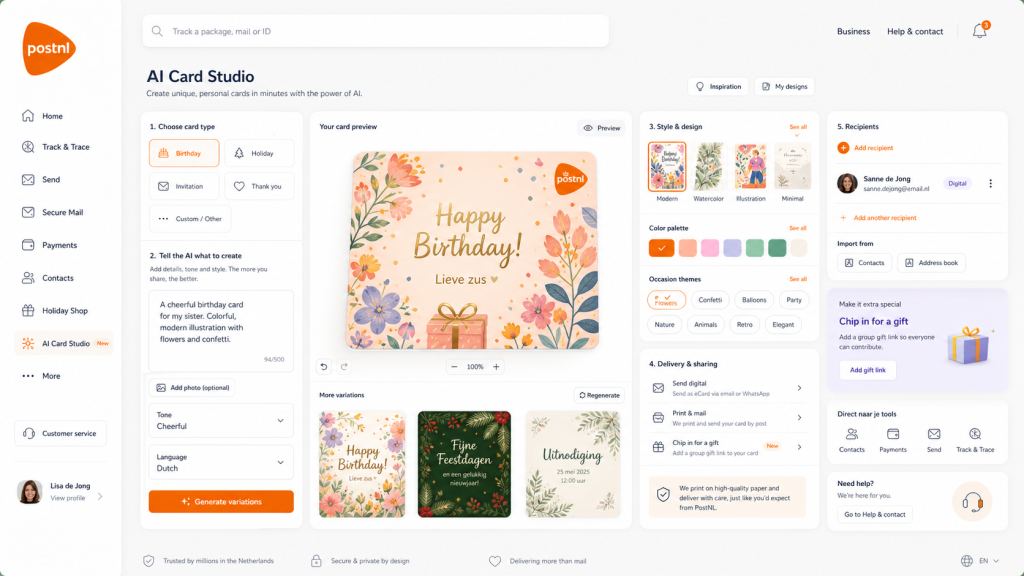
Pillar 4: PostNL AI Card Studio
The AI Card Studio is the emotional heart of the platform.
It connects old postal culture with new creative technology.
Private Use Cases
- Birthday cards.
- Holiday cards.
- Invitations.
- Thank-you cards.
- Condolence cards.
- New baby cards.
- Wedding cards.
- Graduation cards.
- Get-well cards.
- Moving house cards.
- Party invites.
Business Use Cases
- Customer thank-you cards.
- Holiday greetings.
- Loyalty campaigns.
- Appointment reminders.
- Service cards.
- Welcome cards.
- “Sorry we missed you” cards.
- Brand postcards.
- Event invitations.
- Direct-mail campaign cards.
Main Feature
The user can write a message or email, and the system can convert it into a card.
Example flow:
- User writes: “Hi everyone, it is Mark’s birthday next Friday.”
- PostNL offers: “Turn this into a birthday card?”
- User chooses a style.
- AI generates a card.
- User adds a gift collection link.
- User chooses recipients.
- User sends digitally or by physical post.
Delivery Options
- Send as digital card.
- Send as secure message.
- Print and send by post.
- Send to multiple people.
- Add payment chip-in.
- Add RSVP.
- Add attached file.
- Add business branding.
- Add campaign tracking.
AI Card Studio Tagline
Create it with AI. Deliver it with PostNL.
Pillar 5: PostNL Pay
PostNL Pay is not a bank replacement. It is a communication-based payment layer.
The payment belongs inside the act of sending.
Private Payment Use Cases
- Birthday gift chip-ins.
- Party contributions.
- Shared dinner costs.
- Neighborhood collections.
- Club payments.
- School group gifts.
- Charity donations.
- Family reimbursements.
- Event tickets.
- Small invoice payments.
Business Payment Use Cases
- Invoice payment.
- Service payment.
- Subscription payment.
- Return fee.
- Shipping fee.
- Campaign donation.
- Charity drive.
- Membership contribution.
- Deposit payment.
- Paid event invitation.
Features
- Payment links.
- Group collections.
- Payment reminders.
- Split payments.
- Payment status.
- Attach to secure mail.
- Attach to cards.
- Attach to event invitations.
- Attach to business campaigns.
- Receipts in Secure Mail.
- Refund flow.
- Fraud protection.
Payment Tagline
When the message includes money, send it safely.
Pillar 6: PostNL Contacts
Contacts are the social infrastructure of the platform.
The user should not only store names and addresses. The system should understand communication preferences.
Contact Fields
- Name.
- Email address.
- Postal address.
- Phone number.
- Birthday.
- Preferred language.
- Preferred delivery method.
- Digital card preference.
- Physical card preference.
- Business/private category.
- Family group.
- Company group.
- Customer segment.
- Accessibility preference.
Private Contact Groups
- Family.
- Friends.
- Neighbors.
- School.
- Sports club.
- Party invite list.
- Holiday card list.
- Birthday list.
Business Contact Groups
- Customers.
- Leads.
- Newsletter subscribers.
- Service users.
- VIP customers.
- Donors.
- Members.
- Event attendees.
- Parcel recipients.
- Local area segments.
Contact Tagline
Your address book for the digital and physical world.
Pillar 7: PostNL Events
Events combine invitations, cards, payments, files, and delivery.
Private Events
- Birthday party.
- Family dinner.
- Baby shower.
- Graduation.
- Wedding invite.
- Neighborhood barbecue.
- School party.
- Sports event.
- Holiday dinner.
Business Events
- Product launch.
- Store opening.
- Customer day.
- Conference.
- Webinar.
- Fundraiser.
- Membership meeting.
- Political or civic meeting.
- Cultural program.
- Charity campaign.
Features
- AI invitation design.
- RSVP.
- Guest list.
- Payment chip-in.
- File attachments.
- Route and location.
- Calendar link.
- Digital invite.
- Printed invite.
- Reminder card.
- Thank-you card after event.
Event Tagline
Invite, collect, remind, and send — all from one place.
Pillar 8: PostNL Parcels
Parcels remain a core pillar, but they become part of the wider communication experience.
A parcel is not just an object. It is also a message moment.
Parcel Features
- Track & Trace.
- Delivery preferences.
- Pickup points.
- Shipping labels.
- Return labels.
- Parcel notifications.
- Proof of delivery.
- Business shipping.
- Parcel inserts.
- Package communication.
- Customer service updates.
- Packaging shop.
- Sustainability options.
New Concept: Parcel Communication
When a business sends a parcel, it can include:
- A thank-you card.
- A discount card.
- Return instructions.
- Service information.
- A review request.
- A loyalty invitation.
- A secure digital receipt.
- A printed message.
- A QR code linking to files.
- A customer support channel.
Parcel Tagline
Every package is also a communication moment.
Pillar 9: PostNL Holiday Shop
The Holiday Shop brings seasonal commercial energy into the platform.
It should not only be Christmas. It should support Dutch and international cultural calendars.
Seasonal Moments
- Christmas.
- Sinterklaas.
- New Year.
- King’s Day.
- Valentine’s Day.
- Mother’s Day.
- Father’s Day.
- Eid.
- Ramadan.
- Pride.
- Birthdays.
- Weddings.
- Back to school.
- Graduation.
- Local festivals.
- Business holiday greetings.
Products
- Cards.
- AI card templates.
- Stamps.
- Digital stamps.
- Gift wrap.
- Packaging.
- Shipping labels.
- Gift boxes.
- Parcel supplies.
- Seasonal stationery.
- Business greeting campaigns.
- Direct-mail packages.
Holiday Shop Tagline
Cards, gifts, packaging, and postage — ready for every season.
Pillar 10: PostNL Business
The business side is not just “more features.” It is a full communication command center.
Business Dashboard Modules
- Campaign Builder.
- Secure Mail.
- Service Messages.
- Marketing Messages.
- Mass Mailing.
- File Sharing.
- Customer Lists.
- Templates.
- Analytics.
- Payments.
- Direct Mail.
- Printed Cards.
- Parcel Inserts.
- Shipping.
- Customer Support.
- Trust & Compliance.
Business Users
- Webshops.
- SMEs.
- Freelancers.
- Municipalities.
- Healthcare providers.
- Schools.
- Housing associations.
- Charities.
- Unions.
- Political organizations.
- Cultural institutions.
- Publishers.
- Events companies.
- Local shops.
Business Tagline
All customer communication, from inbox to letterbox.
7. Communication Types
The platform should clearly separate communication setups.
This is important because a birthday card, a service update, and a marketing campaign are not the same thing.
7.1 Personal Communication
Used for private human messages.
Examples:
- Birthday card.
- Invitation.
- Thank-you message.
- Family update.
- File sharing.
- Party chip-in.
- Holiday card.
- Printed postcard.
Tone:
Warm, human, simple, accessible.
7.2 Service Communication
Used for necessary, functional, transactional communication.
Examples:
- Delivery update.
- Invoice.
- Payment reminder.
- Appointment confirmation.
- Municipality notice.
- Insurance document.
- School message.
- Return instruction.
- Account update.
- Maintenance notice.
Tone:
Clear, verified, calm, accessible.
Key features:
- Verified sender.
- Proof of delivery.
- Secure attachment.
- Payment option.
- Physical copy option.
- Accessibility version.
- Translation or simplified-language option.
7.3 Marketing Communication
Used for campaigns, promotions, loyalty, and commercial relationship-building.
Examples:
- Newsletter.
- Seasonal campaign.
- Direct-mail card.
- Product launch.
- Discount voucher.
- Loyalty message.
- Event invitation.
- Customer thank-you card.
- Abandoned cart follow-up.
- Parcel insert campaign.
Tone:
Creative, branded, targeted, but privacy-respecting.
Key features:
- Audience lists.
- Consent management.
- Templates.
- A/B testing.
- Channel selection.
- Campaign analytics.
- Print and digital versions.
- File asset library.
- Brand kits.
- Mailing schedule.
7.4 Official Communication
Used for trusted civic and institutional messages.
Examples:
- Municipality decisions.
- Tax notices.
- Housing corporation letters.
- Healthcare documents.
- School records.
- Government forms.
- Legal documents.
- Insurance documents.
Tone:
Formal, verified, accessible, secure.
Key features:
- Strong identity verification.
- Legal timestamp.
- Read receipt.
- Delivery proof.
- Archive.
- Physical copy option.
- Secure file attachment.
- Accessibility mode.
8. Private / Business Split
The interface should always make the distinction visible.
Private Mode
Navigation:
- Home
- Secure Mail
- Files
- Cards
- Payments
- Contacts
- Events
- Parcels
- Holiday Shop
- Trust & Security
Primary CTA:
Send something
Secondary CTA:
Track a delivery
Emotional focus:
- Birthdays.
- Cards.
- Family.
- Friends.
- Payments.
- Parcels.
- Official messages.
- Everyday security.
Business Mode
Navigation:
- Dashboard
- Campaigns
- Service Mail
- Secure Mail
- Files
- Customer Lists
- Templates
- Analytics
- Payments
- Parcels
- Direct Mail
- Brand Assets
- Settings
Primary CTA:
Create campaign
Secondary CTA:
Send service message
Professional focus:
- Customers.
- Campaigns.
- Service.
- Mass mailing.
- Secure communication.
- Direct mail.
- Analytics.
- Compliance.
- File sharing.
- Parcel communication.
9. Signature User Journeys
Journey 1: Birthday Card + Gift Chip-In
- User opens PostNL.
- Birthday reminder appears: “Sanne’s birthday is next week.”
- User clicks “Create card.”
- AI Card Studio opens.
- User writes: “Cheerful card for my sister with flowers and confetti.”
- AI generates three card variations.
- User selects one.
- User adds personal message.
- User adds “Chip in for gift.”
- Contacts are invited to contribute.
- User chooses delivery:
- Digital card now.
- Printed card by post.
- PostNL handles the rest.
Result:
PostNL becomes the birthday organization tool.
Journey 2: Email Becomes Printed Card
- User writes an email.
- The system recognizes emotional tone: birthday, thank-you, condolence, invitation.
- A suggestion appears: “Would you like to send this as a printed card?”
- User clicks.
- AI formats the message into a card.
- User chooses design.
- User selects recipient from contacts.
- User pays postage.
- Card is printed and delivered.
Result:
Digital writing becomes physical care.
Journey 3: Business Service Communication
- A housing corporation needs to inform tenants about maintenance.
- Business user opens PostNL Business.
- Selects “Service Communication.”
- Uploads PDF.
- Chooses audience segment.
- Selects channels:
- Secure Mail.
- Email.
- Printed letter for offline tenants.
- Adds payment or appointment link if needed.
- Sends campaign.
- Dashboard shows delivery, read, and print status.
Result:
Institutions reach everyone, not only the digitally skilled.
Journey 4: Business Marketing Campaign
- A webshop wants to run a holiday campaign.
- Opens PostNL Business.
- Selects “Marketing Campaign.”
- Chooses template: “Holiday greeting + discount.”
- Uploads product images from File Sharing.
- Creates AI card.
- Chooses channels:
- Email.
- Secure Mail.
- Printed card.
- Parcel insert.
- Selects customer segment.
- Schedules campaign.
- Tracks results.
Result:
PostNL becomes a marketing infrastructure for Dutch businesses.
Journey 5: Secure File Sharing + Postal Proof
- A freelancer sends a contract to a client.
- Uploads file to PostNL Files.
- Sends secure mail with verified file link.
- Client opens and signs.
- Freelancer selects “Send printed copy by post.”
- PostNL delivers a physical copy.
- Both parties receive proof.
Result:
PostNL becomes a trusted bridge between digital documents and physical proof.
10. Interface Bible
Visual Identity Direction
The redesign should feel:
- Dutch.
- Civic.
- Clean.
- Trustworthy.
- Warm.
- Modern.
- Accessible.
- Practical.
- Premium but not elitist.
- Friendly but not childish.
- Institutional but not bureaucratic.
Color System
Primary:
- PostNL orange.
- Warm white.
- Soft cream.
- Deep navy or charcoal text.
- Light gray interface surfaces.
Secondary accents:
- Green for verified/safe.
- Blue for secure mail.
- Purple for payments or special features.
- Yellow/gold for holiday/gift moments.
- Red only for warnings.
Typography
- Large, readable sans-serif.
- Strong headings.
- Clear hierarchy.
- Excellent accessibility.
- Avoid tiny gray text.
- Private side may feel warmer.
- Business side may feel sharper and more data-focused.
UI Components
- Rounded cards.
- Modular dashboard panels.
- Clear icons.
- Large action buttons.
- Trust badges.
- Segmented Private / Business switch.
- Search-first navigation.
- Inbox cards.
- File tiles.
- Campaign cards.
- Delivery cards.
- Payment chips.
- AI preview panels.
- Postal conversion buttons.
Main Visual Motif
The brand should visually combine:
- Envelope.
- Inbox.
- Parcel.
- Card.
- Payment.
- File.
- Shield.
- Stamp.
- Contact.
- Route.
- AI sparkle.
- Physical/digital bridge.
11. Tone of Voice Bible
Voice
PostNL should sound:
- Clear.
- Helpful.
- Warm.
- Trustworthy.
- Direct.
- Human.
- Inclusive.
- Not too corporate.
- Not too childish.
- Not too tech-bro.
Example Lines
Portal
Everything you send, in one trusted place.
Secure Mail
Your digital post, private and secure.
Files
Share important files with the same trust as registered mail.
AI Cards
Create it with AI. Send it with care.
Payments
Add a gift link, split a cost, or pay securely.
Business
Reach customers through email, secure mail, printed cards, direct mail, and parcels.
Service Communication
Important messages, delivered clearly.
Marketing
Campaigns that move from inbox to letterbox.
Physical Conversion
Turn this message into a printed card.
12. Product Naming System
Main Products
- PostNL Portal
- PostNL Secure Mail
- PostNL Files
- PostNL AI Card Studio
- PostNL Pay
- PostNL Contacts
- PostNL Events
- PostNL Parcels
- PostNL Holiday Shop
- PostNL Business
- PostNL Campaigns
- PostNL Service Messages
- PostNL Trust
Feature Names
- Print & Send by Post
- Send as Card
- Convert to Physical Mail
- Verified Sender
- Secure File Link
- Gift Chip-In
- Postal Proof
- Hybrid Delivery
- Campaign Builder
- Service Setup
- Marketing Setup
- Audience Lists
- Parcel Insert
- Direct Mail Flow
13. Business Communication Suite
Purpose
The Business Communication Suite gives organizations one dashboard to manage all outgoing communication.
Core Areas
- Campaign Builder
- Service Messaging
- Secure Mail
- Mass Mailing
- Direct Mail
- Printed Cards
- File Sharing
- Customer Lists
- Templates
- Analytics
- Payments
- Parcel Communication
13.1 Campaign Builder
Used for marketing.
Features:
- Campaign name.
- Campaign goal.
- Audience.
- Channel selection.
- Template selection.
- AI copy assistance.
- AI image/card generation.
- File asset library.
- Scheduling.
- Consent checks.
- Analytics.
Channel choices:
- Email.
- Secure Mail.
- Printed card by post.
- Printed letter.
- Direct mail.
- Parcel insert.
- Payment request.
- Landing page link.
13.2 Service Messaging
Used for necessary communication.
Features:
- Verified sender.
- Secure file attachment.
- Delivery proof.
- Read status.
- Physical fallback.
- Language simplification.
- Accessibility mode.
- Payment link.
- Appointment link.
- Support contact.
Examples:
- “Your appointment has changed.”
- “Your delivery is delayed.”
- “Your invoice is ready.”
- “Your policy document has been updated.”
- “Your permit decision is available.”
13.3 Mass Mailing
Mass mailing should include both digital and physical options.
Features:
- Import contacts.
- Manage lists.
- Segment audience.
- Create message.
- Choose delivery channel.
- Test send.
- Schedule.
- Track delivery.
- Manage unsubscribes.
- Respect consent rules.
- Export report.
Important distinction:
Marketing mass mailing requires consent and preference management.
Service mass mailing may be necessary communication, but still requires clarity, privacy, and accountability.
13.4 File Sharing / Brand Assets
Business users need an asset library.
Features:
- Logo files.
- Campaign images.
- PDFs.
- Brochures.
- Legal documents.
- Postal artwork.
- Card templates.
- Product photos.
- Shipping documents.
- Team folders.
- Permissions.
- Expiry links.
14. AI System Bible
AI should be assistive, not exploitative.
AI Functions
Private AI
- Write birthday message.
- Make card design.
- Translate message.
- Simplify official letter.
- Suggest polite reply.
- Create invitation.
- Create condolence message.
- Summarize long mail.
- Detect phishing.
- Suggest physical card option.
Business AI
- Generate campaign copy.
- Create direct-mail card.
- Summarize customer messages.
- Create service message in plain language.
- Translate communication.
- Create variations for A/B testing.
- Convert email into printed mailing.
- Suggest audience segments.
- Create accessible versions.
- Generate campaign subject lines.
AI Ethics
- No training on private mail without consent.
- No ad targeting from private messages.
- Clear AI labeling.
- Human preview before sending.
- Safety filters for cards and mass campaigns.
- Respect for children, elderly users, and vulnerable people.
- Explainable suggestions.
- Strong privacy controls.
AI Tagline
AI that helps you communicate — not AI that harvests your life.
15. Trust & Security Bible
Trust is the core commercial and public value.
Trust Features
- Verified sender.
- Verified recipient.
- Encryption.
- Secure file sharing.
- Delivery proof.
- Read receipt.
- Fraud detection.
- Phishing warning.
- Official-message label.
- Payment safety.
- Two-factor authentication.
- Device management.
- Privacy dashboard.
- Data retention controls.
- Physical fallback.
- Human support.
Trust Language
Avoid technical overload. Use plain language.
Instead of:
“End-to-end cryptographic identity protocol enabled.”
Say:
“This sender is verified. This message was delivered securely.”
16. Accessibility Bible
The platform should be designed for everyone.
Accessibility Requirements
- Large readable type.
- High contrast.
- Simple language mode.
- Screen reader support.
- Keyboard navigation.
- Clear focus states.
- Dutch language first, multilingual support.
- Icons with labels.
- No hidden critical actions.
- Elderly-friendly onboarding.
- Physical mail fallback.
- Customer support integration.
- Printable summaries.
- Plain-language explanation of official messages.
Accessibility Tagline
Digital service that does not abandon offline people.
17. Data and Privacy Bible
Principles
- User owns their communication.
- Private messages are not advertising inventory.
- File sharing is permission-based.
- AI use is transparent.
- Business campaigns respect consent.
- Data minimization by default.
- Strong retention controls.
- Clear delete and archive options.
- Separate private and business data.
User Controls
- Download data.
- Delete data.
- Archive data.
- Manage permissions.
- Manage AI access.
- Manage marketing preferences.
- Manage file-sharing links.
- Manage payment history.
- Manage verified senders.
- Manage physical address visibility.
18. Campaign Bible
Main Campaign
Title
Everything You Send
Master Line
PostNL. For everything you truly want to send.
Campaign Message
The post is no longer only paper.
It is a birthday card, a secure email, a file, a payment, a package, an invitation, a campaign, a receipt, a service update, and a promise.
PostNL brings it all together.
Campaign 1: “One Birthday, One Place”
Shows:
- Birthday reminder.
- AI card.
- Group gift payment.
- Contact list.
- Printed card by post.
- Package gift delivery.
Line:
Birthday? Card, gift, payment, and delivery — all with PostNL.
Campaign 2: “From Email to Letterbox”
Shows:
- User writes an email.
- Clicks “Send as printed card.”
- Card is printed.
- Postal worker delivers it.
- Recipient opens it.
Line:
Write digital. Deliver physical.
Campaign 3: “For Business: Inbox to Letterbox”
Shows:
- Company campaign dashboard.
- Email version.
- Secure mail version.
- Printed direct mail.
- Parcel insert.
- Analytics.
Line:
Customer communication across every channel.
Campaign 4: “Trusted Files”
Shows:
- Contract shared securely.
- Verified recipient.
- Physical copy sent.
- Proof archived.
Line:
Important files deserve trusted delivery.
Campaign 5: “Service for Everyone”
Shows:
- Municipality sends notice.
- Digital users receive Secure Mail.
- Offline users receive printed letter.
- Elderly person gets physical copy.
- Dashboard confirms delivery.
Line:
Digital progress, without leaving people behind.
19. Franchise Content Formats
This concept can extend into multiple media and deliverable formats.
Product Concept Art Series
- PostNL Portal
- AI Card Studio
- Secure Mail Inbox
- Holiday Shop & Delivery
- File Sharing
- Business Communication Suite
- Campaign Builder
- Service Message Flow
- Private Birthday Journey
- Hybrid Mail Factory / Print & Send Flow
Pitch Deck Sections
- Problem
- Social-democratic opportunity
- New PostNL positioning
- Ecosystem overview
- Private side
- Business side
- Secure Mail
- File Sharing
- AI Cards
- Payments
- Marketing and service communication
- Rollout
- Public-value impact
- Revenue model
- Visual direction
- Campaign proposal
Video Concept
A split-screen film:
Left side: old paper mail.
Right side: fragmented digital life.
Then PostNL unifies:
Email becomes card.
Card becomes post.
Invitation becomes payment.
File becomes secure delivery.
Parcel becomes customer communication.
Business campaign becomes digital and physical.
Final line:
The post has changed. The trust remains.
20. Rollout Strategy
Phase 1: Repositioning
Launch the new brand idea:
Everything You Send
Update messaging around:
- Secure communication.
- AI cards.
- Parcels.
- Payments.
- File sharing.
- Hybrid delivery.
Goal:
Make the public understand that PostNL is more than parcels and paper.
Phase 2: Private MVP
Launch:
- AI Card Studio.
- Birthday reminders.
- Contacts.
- Gift chip-in.
- Print & send card.
- Secure Mail inbox beta.
- Track & Trace integration.
Why this first?
Because birthdays are emotionally clear. People immediately understand the value.
Phase 3: Secure Mail + Files
Launch:
- Secure email.
- File sharing.
- Verified sender.
- Physical mail conversion.
- Official message categories.
- Payment requests.
Goal:
Build trust infrastructure.
Phase 4: Business Communication Suite
Launch:
- Business dashboard.
- Campaign builder.
- Service messaging.
- Mass mailing.
- File asset library.
- Audience lists.
- Direct mail.
- Printed card campaigns.
- Analytics.
Goal:
Turn PostNL into a business communication platform.
Phase 5: Civic Partnerships
Partner with:
- Municipalities.
- Schools.
- Care organizations.
- Housing corporations.
- Unions.
- Public institutions.
- Libraries.
- Local government.
- Community organizations.
Goal:
Make PostNL the bridge between digital government, physical mail, and citizens.
21. Revenue Model
Private Revenue
- Premium Secure Mail storage.
- AI card generation packs.
- Printed cards.
- Postage.
- Parcel shipping.
- Holiday shop products.
- Gift chip-in service fee.
- Secure file storage upgrade.
- Registered digital mail.
- Physical mail conversion.
Business Revenue
- Monthly business subscriptions.
- Campaign sending fees.
- Direct-mail production.
- Printed cards.
- Secure mail volume pricing.
- File storage.
- Verified sender accounts.
- Analytics packages.
- Service messaging contracts.
- Parcel communication tools.
- API access.
- Public-sector contracts.
Public-Value Model
Some basic services should remain affordable or free:
- Basic secure inbox.
- Basic official messages.
- Basic accessibility tools.
- Basic physical fallback for essential public communication.
22. Risks and Safeguards
Risk: Becoming Too Much Like Big Tech
Safeguard:
- Privacy-first model.
- No ad targeting from private mail.
- Transparent AI use.
- Public-value charter.
Risk: Overcomplicated App
Safeguard:
- Clear Private / Business split.
- Simple home dashboard.
- Search-first interface.
- Guided flows.
- Human support.
Risk: Excluding Elderly or Low-Digital Users
Safeguard:
- Physical fallback.
- Local service points.
- Plain-language mode.
- Printed summaries.
- Assisted account setup.
Risk: Business Spam
Safeguard:
- Consent management.
- Anti-spam rules.
- Reputation scoring.
- Clear unsubscribe.
- Verified sender accountability.
Risk: AI Misuse
Safeguard:
- Human preview before send.
- Safety moderation.
- Consent controls.
- Clear AI labeling.
23. Key Screens to Design
Screen 1: Portal
Shows the whole ecosystem:
- Private / Business switch.
- Secure Mail.
- Files.
- AI Cards.
- Payments.
- Parcels.
- Holiday Shop.
- Campaigns.
- Service Communication.
- Track & Trace.
- Notifications.
Screen 2: AI Card Studio
Shows:
- Prompt panel.
- Card preview.
- Template styles.
- Recipients.
- Gift chip-in.
- Delivery choices.
- File/media library.
- Private/business mode.
- Marketing/service/personal setup.
Screen 3: Secure Mail
Shows:
- Inbox.
- Verified senders.
- Attachments.
- File-sharing sidebar.
- “Send as printed card by post.”
- “Convert to physical mail.”
- Personal/service/marketing filters.
- Business mass mailing tools.
Screen 4: Business Communication Suite
Shows:
- Business active.
- Campaign builder.
- Service setup.
- Marketing setup.
- Audience lists.
- Secure Mail.
- File sharing.
- Direct mail.
- Printed cards.
- Parcel inserts.
- Analytics.
Screen 5: File Sharing
Shows:
- Folders.
- Shared links.
- Recent files.
- Secure access.
- Attach to mail.
- Attach to card.
- Print and send.
- Business brand assets.
Screen 6: Hybrid Send Flow
Shows:
User writes once, then chooses:
- Email.
- Secure Mail.
- Printed letter.
- Printed card.
- Direct mail.
- Parcel insert.
- File link.
- Payment link.
This is the core magic screen.
24. The Core Product Sentence
The entire concept can be summarized in one sentence:
PostNL becomes a trusted Dutch platform where private people and businesses can send secure mail, share files, create AI cards, collect payments, manage parcels, run campaigns, and convert digital communication into physical post whenever needed.
25. Final Franchise Statement
The future of PostNL is not only logistics.
It is not only parcels.
It is not only stamps.
It is not only delivery windows.
It is not only a postal obligation.
The future of PostNL is the full spectrum of sending.
A society still needs trusted channels.
Families still need cards.
Businesses still need customers.
Citizens still need official messages.
Communities still need invitations.
People still need to share files.
Parties still need payment collections.
Institutions still need service communication.
Marketing still needs physical and digital reach.
And sometimes, even in a digital world, a message still needs to arrive on paper.
That is where PostNL can become essential again.
Final Line
PostNL: the civic internet layer for everything the Netherlands sends — digital, physical, private, public, personal, and professional.
0 comments